Measures ingestion #
When it comes to receiving data, the Kuzzle IoT Platform is capable of receiving raw data or formatted data in the form of measures.
These measures are then passed through the ingestion pipeline to allow to perform processing at various stages.
Raw data #
In order to process raw data, the Kuzzle IoT Platform must normalize it into measures. This process is called data "decoding" and consists of extracting measures from a data frame.
The data received must be in the form of JSON documents. Other formats such as CSV will need to be pre-processed.
The Kuzzle IoT Platform includes a specialized ETL to standardize data: Decoders
The raw data received is systematically stored for later analysis.
Decoder #
A Decoder comes in the form of an interface to be implemented using the backend framework of the Kuzzle IoT Platform.
Each model of Decoder can be associated with a Decoder in order to normalize the received data into measures usable by the device.
A Decoder is responsible for
- declare the measures it will process
- register a corresponding API action
- (optional) modify the mapping of the collection containing the raw data
- (optional) validate the format of the received data
- extract measures from the received data
Declaration of measures #
The declaration of the measures is done through a public property on the class.
This property is marked as const to provide additional type checking when extracting measures.
export class AbeewayDecoder extends Decoder {
   // declare the measures decoded by the Decoder
   public measures = [
     { name: "temperature", type: "temperature" },
   ] as const;
}
Recording an API action #
An API action is automatically added to the Kuzzle IoT Platform for each Decoder.
By default, this action uses the class name in snake-case format:
AbeewayDecoder=>abeeway(HTTP route:POST /_/device-manager/payload/abeeway)ElsysErsDecoder=>elsys-ers(HTTP route:POST /_/device-manager/payload/elsys-ers)
It is possible to customize:
- API action by declaring the
actionproperty on the class - the HTTP route by declaring the
httpproperty on the class
export class ElsysErsDecoder extends Decoder {
  constructor() {
    super();

    // action will be "elsys" instead of "elsys-ers"
    this.action = "elsys";

    // HTTP route will be "/_/ingest/elsys"
    this.http = [{ verb: "post", path: "ingest/elsys" }];
  }
}
Modifying payloads collection mappings #
Each data frame received by the Kuzzle IoT Platform is stored in the payloads collection of the platform index. See Raw Data.
It is recommended to modify the mappings of this collection using the payloadsMappings property to make it easier to find payloads belonging to a specific device.
For example, if your raw data contains the device reference in the deviceEUI property, then it makes sense to add this property so that you can list all frames belonging to a device.
export class ElsysErsDecoder extends Decoder {
  constructor() {
    super();

    /**
     * Raw payload format
     * {
     * "deviceEUI": <device reference>,
     * "temperature": <temperature measure>,
     * ...
     * }
     */
    this.payloadsMappings = {
      deviceEUI: { type: "keyword" },
    };
  }
}
Raw data validation #
To ensure that you can extract the measures from an expected format, it is possible to implement the validate method.
This method takes the raw data frame as a parameter and can indicate that:
- the format is respected by returning
true - this dataframe should be discarded by returning
false - the format of this frame is incorrect throwing an exception
Depending on the result of the validate method, the API action will return either a 200 status (Case 1 and 2) or a 4** status (case 3).
For each case, a state and a reason is stored inside the payload document:
- the payload has a VALID state.
- the payload is discarded by user validation and has a SKIP state and a dedicated reason (which can be overridden by throwing a SkipError exception).
- the payload has an ERROR state and a reason equal to the error message.
class AbeewayDecoder extends Decoder {
  async validate(payload: JSONObject) {
    if (payload.deviceEUI === undefined) {
      throw new BadRequestError('Invalid payload: missing "deviceEUI"');
    }

    // Skip payload without data
    if (payload.type === "ping") {
      return false;
    }

    return true;
  }
}
Extracting measures #
The decode method is in charge of transforming the raw data into standardized measures.
It receives three arguments:
decodedPayload: instance ofDecodedPayloadused to extract measurespayload: raw datarequest: Kuzzle request
Each measure must be extracted using the addMeasurement method of the decodedPayload object.
This method has more arguments:
reference: unique reference of the device for which the measure is extractedmeasureName: name of the extracted measure (must match a declared measure name)measure: an object containing the measure with the following properties:measuredAt: timestamp at which the measure was made (in milliseconds)type: type of the measure (must match a declared measure type)values: contains the values of the measure
export class AbeewayDecoder extends Decoder {
// declare the measures decoded by the Decoder
   public measures = [
     { name: "external temperature", type: "temperature" },
   ] as const;

   async decode(
     decodedPayload: DecodedPayload<AbeewayDecoder>,
     payload: JSONObject,
     request: KuzzleRequest
   ) {
     decodedPayload.addMeasurement<TemperatureMeasurement>(
       payload.deviceEUI, // device reference
       "external temperature", // measure name
       {
         measuredAt: Date.now(),//measure timestamp
         type: "temperature", // measure type
         values: {
           temperature: payload.temp,//measure value
         },
       }
     );

     return decodedPayload;
   }
}requestcan be use to interract with kuzzle request as documented onto kuzzle documentation. (ex: configure response format usingrequest.response.configure.)
Registration on the framework #
Finally, it is necessary to register our Decoder for a particular Sensor using the framework.
To do this, use the models.registerDevice method of the Device Manager plugin:
// Retrieve the Device Manager plugin from the framework
const deviceManager =
  app.plugins.get < DeviceManagerPlugin > "device-manager";

deviceManager.models.registerDevice("Abeeway", {
  decoder: new AbeewayDecoder(),
});
Normalized data #
The Kuzzle IoT Platform is also able to directly receive standardized measures without going through a Decoder.
The API action device-manager/devices:receiveMeasures is able to ingest multiple measures from a device.
This avoids having to go through the step of writing the Decoder and redeploying the application but requires being able to format the data correctly.
The normalized data received is systematically stored for later analysis.
Example of sending measures in HTTP
curl -X POST \
   -H "Content-Type: application/json"\
   "http://localhost:7512/_/device-manager/{engine}/device/{deviceId}/measures"\
   --data '{
     "measures":[
         {
           "measureName": "temperature",
           "type": "temperature",
           "measuredAt": 1677266659115,
           "values": {
             "temperature": 21,
           },
         },
       ]
   }'
Traceability of raw data #
All of the data received by the Kuzzle IoT Platform is systematically stored in a collection to allow subsequent analysis.
The payloads collection of the platform index contains the following information for each piece of data received:
deviceModel: device model for which the data was intendeduuid: unique identifier of the data receivedvalid: boolean indicating whether the data could be processed correctlyapiAction: API action that was used to send the datastate: the state of the payload : VALID if it's valid, SKIP if the payload is skipped by the user during validation or ERROR if an error is raised during payload reception.reason: the reason of an error if the payload is in error (otherwise it will be undefined).
For each measure contained in the Kuzzle IoT Platform, it is possible to go back to the raw data in order to analyze possible problems in the standardization stage.
The payloadUuids property contained in the measures allows you to search the payloads collection to find the corresponding data frames.
Measures Sources #
Measures can originate from different sources:
Device Measure Source #
Represents measures coming directly from a physical device.
- Properties:
type: Always "device"id: Unique identifier of the sourcereference: Device referencedeviceMetadata: Metadata of the devicemodel: Device modellastMeasuredAt: (optional) Timestamp of the last measurement
API Measure Source #
Represents measures coming from an API call.
- Properties:
type: Always "api"id: Unique identifier of the source
Measures Targets #
Measures are directed towards specific targets:
Device Measure Target #
Targets a device entity within the platform.
- Properties:
type: Always "device"assetId: (optional) linked Asset identifierindexId: Index identifier
API Measure Target #
Targets an API entity or external systems.
- Properties:
type: Always "api"assetId: Associated asset identifierengineGroup: (optional) Specific engine group targetedindexId: Index identifier
Events Emitted During Measure Processing #
To enrich or modify measures during ingestion, the Kuzzle IoT Platform provides events emitted at various stages. Below are the details on events triggered during measure processing:
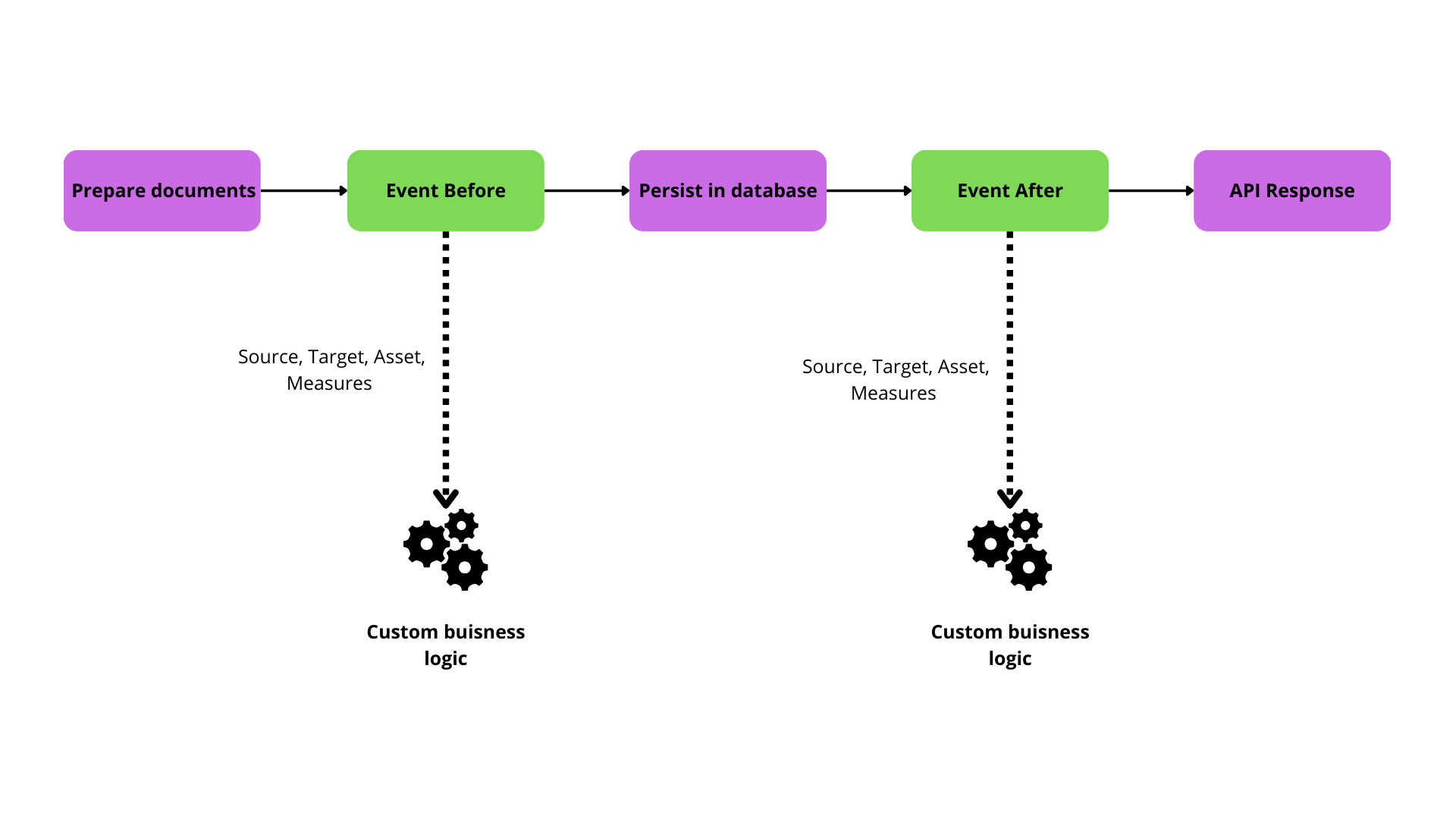
Event Before process : device-manager:measures:process:before #
Triggered before measures are processed and persisted. Ideal for enriching measures or adjusting metadata prior to saving.
- Event properties:
source: Origin of the measures (Device or API).target: Intended target for the measures (Device or API).asset: (optional) Asset associated with the device.measures: Array of measures to be processed.
Example of enriching a measure:
app.pipe.register('device-manager:measures:process:before', async ({ measures, source, target, asset }) => {
  for (const measure of measures) {
    if (measure.type === "temperature" && measure.values.celsius) {
      measure.values.fahrenheit = measure.values.celsius * 9/5 + 32;
    }
  }

  return { measures, source, target, asset };
});
Tenant-specific event #
An isolated tenant-specific event variant is also available:
engine:<engine-id>:device-manager:measures:process:beforeEvent After Process(device-manager:measures:process:after) #
Triggered after measures have been processed and persisted. Suitable for triggering further actions based on new data.
- Event properties:
source: Origin of the measures.target: Destination for the measures.asset: (optional) Updated asset state associated with the measures.measures: Array of persisted measures.
Example: Trigger an alert after processing measures
app.pipe("device-manager:measures:process:after", async ({ measures, source, asset }) => {
  for (const measure of measures) {
    if (measure.type === "security_alert" && measure.values.alertType === "forced_entry") {
      notifySecurityTeam(asset, measure);
    }
  }

  return { measures, source, target, asset };
});
Tenant-specific events #
Tenant-specific events are also available for isolated measure processing:
- Before processing:
engine:<engine-id>:device-manager:measures:process:before
- After processing:
engine:<engine-id>:device-manager:measures:process:after
These events carry the same properties as their global counterparts and allow for tenant-specific customizations and workflows.